
WadaMesh
Version: beta_91-A001 | Published by Attaky
WadaMesh
A standalone touchscreen mesh communicator for the Attaky Mesh series.
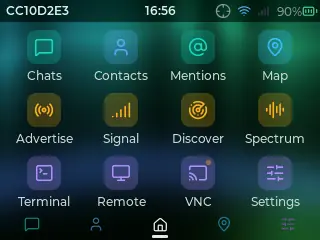
WadaMesh turns an Attaky Mesh device into an off-grid messenger. Chat, contacts, channels, the map and settings run on the handheld itself, over LoRa mesh radio that speaks the MeshCore protocol, with GPS positioning and battery telemetry built in.
Highlights
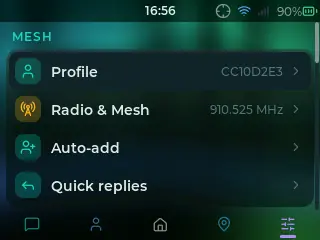
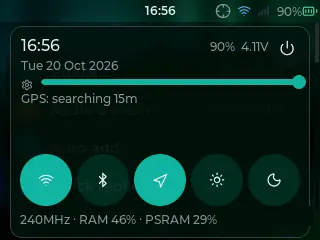
- A redesigned touch interface: One clean dark design across every screen, with Settings grouped into Mesh, Connections, Device and System.
- Off-grid messaging: Chats with All, Channels and Direct filters, contacts, and a header that shows how each message reached you.
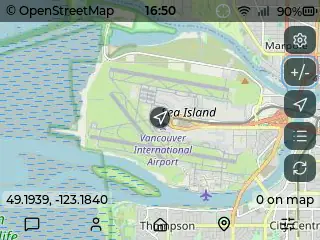
- Map and GPS: Your position and the mesh nodes you hear on an OpenStreetMap map, with a GPS icon in the status bar.
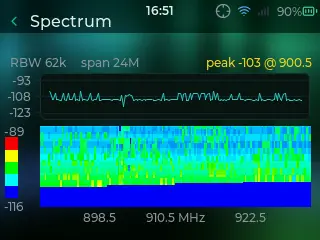
- Spectrum view: A live sweep of the LoRa band with a waterfall, to see what is on the air around you.
- Make it yours: Day and night themes, accent colours, backgrounds, a lock screen with an optional PIN, and a screensaver that maps the nodes you have heard.
- Control from a browser: Turn on VNC to see and use the device screen from any web browser on the same Wi-Fi.
Keyboard and Power
Mesh Deck users can type on the hardware keyboard alongside the on-screen keyboard. With a battery module fitted, the status bar shows the battery level, and a battery saver helps a charge last longer.
Compatibility
WadaMesh runs on Attaky Core with the LoRa + GPS module of the Mesh Pocket, Mesh Deck and Mesh Station Junior. The keyboard module and the battery module are optional.
About this firmware
WadaMesh for Attaky is a port by Attaky of WadaMesh by ALLFATHER-BV, adapted to the Attaky Mesh series. The original project is released under the GNU General Public License v3.0 or later, and the source for this build is published with the Attaky fork; thanks to the upstream authors.
Install
Install straight from the Attaky firmware store. Open this listing in your browser and flash it to your Attaky in one tap. There is nothing to download or install — the firmware store writes it to your device for you.
Release Notes
Updated to upstream WadaMesh beta_91 (from beta_47).
- A redesigned interface on every screen: one dark palette, line icons, a calmer status bar, and Settings grouped into Mesh, Connections, Device and System.
- A Theme page with day and night modes, accent colours and colour styles, and an optional background behind every screen.
- Chats with All, Channels and Direct filters, and a conversation header that shows how each message reached you.
- A new lock screen with an optional PIN, a screensaver that maps the nodes you have heard, and notification cards for messages that arrive while the screen is dark.
- Spectrum: a live sweep of the LoRa band with a waterfall view.
- VNC: view and control the device from a web browser on the same Wi-Fi.
- A GPS icon in the status bar, and a GPS battery saver that rests the receiver between position checks.
- A battery saver switch and an adjustable screen timeout.
- On Attaky: the battery level now also works with more Attaky power modules.
- On Attaky: a key typed right after Enter in a settings field is no longer lost, and the setup wizard's on-screen keyboard no longer pops up on entry and can be closed without the keyboard module.
Known limitations
- While the Spectrum app is open, the browser view (VNC) pauses; it resumes when you leave Spectrum.
- This build is for the LoRa + GPS module of the Mesh Pocket, Mesh Deck and Mesh Station Junior. It does not run the radio of other Attaky LoRa modules.
Download Files
| Flash Address | File Name | Action |
|---|---|---|
0x0 |
WadaMesh-beta_91-A001-wadamesh-beta_91-A001-bootloader.bin | Download |
0x8000 |
WadaMesh-beta_91-A001-wadamesh-beta_91-A001-partition-table.bin | Download |
0xe000 |
WadaMesh-beta_91-A001-wadamesh-beta_91-A001-boot-app0.bin | Download |
0x10000 |
WadaMesh-beta_91-A001-wadamesh-beta_91-A001-firmware.bin | Download |