Voice Memo
Version: 1.0.0 | Published by Attaky
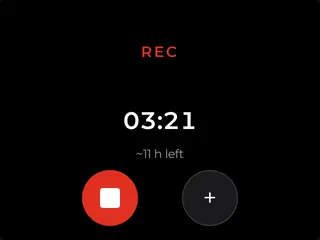
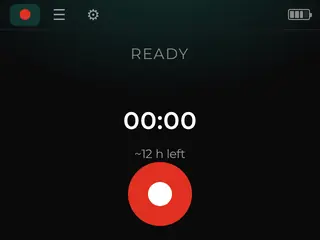
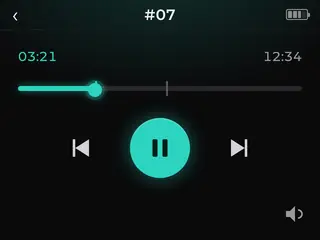
A pocket voice recorder for Attaky that captures long, continuous audio to a memory card and plays it back on the device, fully offline.
Voice Memo turns your Attaky Core with the Media-IO module into a straightforward voice recorder. Use the physical record key to start and stop long recording sessions, save them as standard WAV files on your memory card, then browse, play back, seek through, and manage recordings directly on the touchscreen. Your audio stays on the device and the card, with no cloud account or online service involved.
Highlights
- Pocket voice recorder: Capture long, continuous audio recordings straight to a memory card.
- One-touch recording: Start and stop with the physical record key, even while the screen is dimmed.
- Moment markers: Drop a marker while recording, then jump back to it during playback.
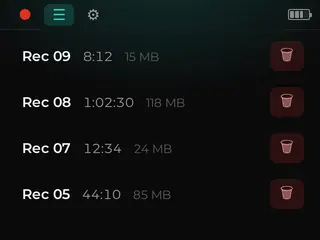
- Touchscreen playback: Browse recordings, play audio, seek through files, and adjust volume on the device.
- Simple file management: Delete recordings from the touch-first interface.
- Standard audio files: Save recordings as WAV files on a FAT32 or exFAT memory card.
- Easy archiving: Remove the card and copy recordings to a computer.
- Fully offline: No cloud, no account, and no on-device speech recognition.
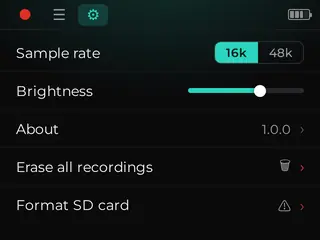
- Built-in settings: Choose sample rate, adjust screen brightness, view About details, and format the card from the device.
Capture long recordings
Voice Memo is built for direct, continuous recording. Press the physical record key to begin capturing audio, then press it again to stop. Recordings are written straight to the memory card, so the device works like a dedicated pocket recorder instead of a connected app or cloud service.
Record with the screen dimmed
The physical record key keeps recording control available even when the screen is dimmed. You do not need to keep the touchscreen active just to start or stop a capture. The core recording action stays on the hardware key, while the touchscreen remains available for browsing, playback, and management.
Mark moments as they happen
Use the drop-a-marker key to flag a moment during a recording. Later, during playback, you can jump back to marked points instead of only seeking manually through the audio. It is a simple way to make long recordings easier to revisit on the device.
Playback and manage on the touchscreen
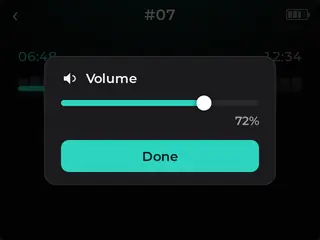
Voice Memo includes on-device playback with a touch-first interface. Browse the file list of recordings, start playback, seek through audio, adjust volume, and delete recordings from the touchscreen. The same device that captures the audio can also be used to review and clean up your recording list.
Your files, your way
Recordings are saved as standard WAV audio files on a FAT32 or exFAT memory card. When you want to copy or archive them, remove the card and open it on a computer. Your recordings are stored as regular files on the card, so they are not locked inside an account or cloud library.
Private and offline
Voice Memo runs fully offline. There is no cloud upload, no account sign-in, and no on-device speech recognition. Audio never leaves the Attaky device and the memory card unless you choose to remove the card and copy the files yourself.
Settings and card management
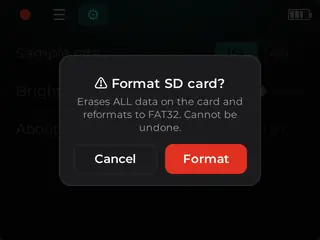
The settings screen gives you practical controls for the recorder: choose the sample rate, adjust screen brightness, and view the About screen. Voice Memo also includes on-device card management, so you can format the memory card directly from the device when you need a fresh recording card.
Compatibility
Voice Memo requires the Attaky Core paired with the Media-IO module, which provides the memory card, microphone, and speaker capabilities used by the firmware. A memory card is required for saving recordings. The optional battery module can be added for portable use.
Install
Install straight from the Attaky firmware store — open this listing in your browser and flash it to your Attaky in one tap. There's nothing to download or install; the firmware store writes it to your device for you.
Release Notes
- Long-duration recording to microSD as standard WAV files.
- On-device playback — file list, playback with seek and volume, delete.
- Physical record key (start/stop, works with the screen dimmed) and a marker key to flag moments while recording.
- Touch-first UI for browsing and managing recordings.
- Offline — no cloud, no ASR on-device; audio stays on the device and card.