Clawdmeter
Version: 2.2.1-A001 | Published by Attaky
Clawdmeter
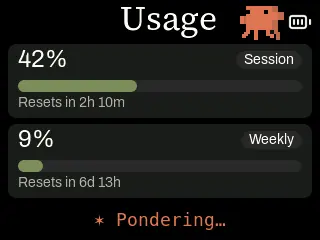
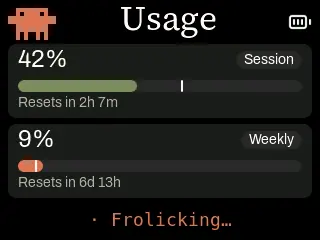
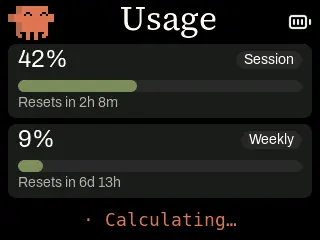
Your Claude Code usage at a glance, on a desk-side Attaky screen — with a pixel-art Clawd who gets busier as you work.
Clawdmeter turns Attaky Core into a small usage dashboard for Claude Code. The Clawdmeter desktop app on your computer reads your current session and weekly usage and sends it to the device over Bluetooth, so you can see how much of your limits you have used and when they reset without switching windows.
Highlights
- Session and weekly usage: Two meters with the percentage used, a progress bar and a countdown to the next reset.
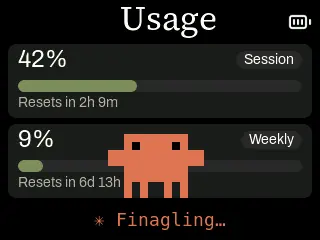
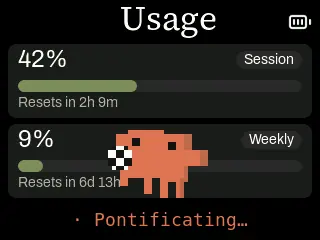
- Clawd on your desk: The pixel-art mascot wanders, peeks and performs full-size scenes in front of the meters, and gets livelier the more you use Claude Code.
- Pace marker: An optional marker on each bar shows where you would be if you spread your limit evenly.
- Bluetooth keyboard keys: The D-pad, SELECT, L1 and R2 send arrows, Enter, Shift+Tab and Space to Claude Code, including voice push-to-talk.
- Battery level: A battery indicator appears when the battery module is fitted, so the meter can sit anywhere on your desk.
How it works
The device does not connect to the internet itself. The Clawdmeter desktop app (macOS, Windows or Linux) uses your existing Claude Code sign-in to check your usage and follows Claude Code events, then sends the numbers to the device over Bluetooth Low Energy. Pair the device in your computer's Bluetooth settings first; it appears as "Attaky Claude Monitor".
Use the Attaky build of the desktop app: download release v2.2.1-A001 for macOS, Windows or Linux from the Releases page of the Attaky Clawdmeter repository linked on this page. The original Clawdmeter app does not recognise the Attaky version of the device, so do not install it or accept its offer to update to a newer original release. Flash the device from this store, not from the app's built-in flasher, which only lists the original boards.
Keys
The D-pad and SELECT send arrow keys and Enter to the focused window. L1 sends Shift+Tab to change the Claude Code mode, and R2 sends Space for voice push-to-talk. POWER steps the screen brightness. BOOT wakes the screen; hold BOOT for 3 seconds and release to clear the Bluetooth pairing.
Compatibility
Clawdmeter requires Attaky Core. Add the battery module to show battery level and run it away from USB power. You also need a computer with Bluetooth running the Clawdmeter desktop app, and Claude Code signed in with an active subscription.
About this firmware
Clawdmeter for Attaky is a port by Attaky of Clawdmeter by Hermann Björgvin Haraldsson, adapted to Attaky modular hardware. It is an unofficial community project and is not made, sponsored or endorsed by Anthropic. Claude, Claude Code and the Clawd character are trademarks or copyrighted material of Anthropic and are used here only to describe what the firmware works with. The upstream project is not released under an open-source license; its source and the Attaky port are available from the links on this page.
Install
Install straight from the Attaky firmware store. Open this listing in your browser and flash it to your Attaky in one tap. Then install the Attaky build of the Clawdmeter desktop app (release v2.2.1-A001 from the Attaky Clawdmeter repository) and pair the device over Bluetooth.
Release Notes
First release for Attaky, based on upstream Clawdmeter v2.2.1.
- A new usage dashboard that lays itself out for the Attaky screen: session and weekly usage, each with a progress bar and a reset countdown, and a status line that changes as Claude works.
- Clawd now lives on the dashboard: he wanders, peeks, celebrates and performs full-size scenes in front of the meters, and gets livelier the more you use Claude Code.
- Optional pace marker on the usage bars shows where you would be if you used your limit evenly.
- Works with the Attaky build of the Clawdmeter desktop app for macOS, Windows and Linux (release v2.2.1-A001), which reads your usage and Claude Code events and sends them to the device over Bluetooth.
- Screen brightness levels and a gentle idle fade; POWER steps the brightness.
- Keys work as a Bluetooth keyboard for Claude Code: arrows and Enter on the D-pad and SELECT, Shift+Tab on L1 to change mode, Space on R2 for voice push-to-talk.
- BOOT wakes the screen; hold BOOT for 3 seconds and release to clear the Bluetooth pairing.
- Battery level from the battery module, and open fonts throughout.
Download Files
| Flash Address | File Name | Action |
|---|---|---|
0x0 |
Clawdmeter-2.2.1-A001-clawdmeter-2.2.1-A001-bootloader.bin | Download |
0x8000 |
Clawdmeter-2.2.1-A001-clawdmeter-2.2.1-A001-partitions.bin | Download |
0xe000 |
Clawdmeter-2.2.1-A001-clawdmeter-2.2.1-A001-boot-app0.bin | Download |
0x10000 |
Clawdmeter-2.2.1-A001-clawdmeter-2.2.1-A001-firmware.bin | Download |