NerdMiner
Version: 1.8.3-A001 | Published by Attaky
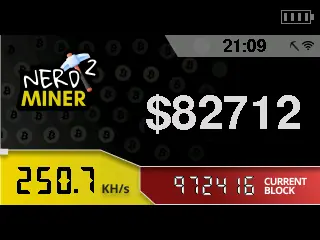
NerdMiner
A tiny solo Bitcoin miner for your Attaky — learn how mining works, one hash at a time.
NerdMiner turns Attaky Core into a pocket Bitcoin miner. It joins a public mining pool over Wi-Fi, hashes on both processor cores and shows its work on the screen, together with the live state of the Bitcoin network. It is a learning toy and a lottery ticket, not a money maker.
Highlights
- Real mining: Connects to the public-pool.io solo pool by default and hashes at about 250 thousand hashes per second.
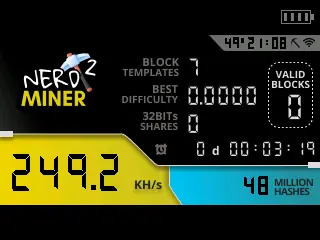
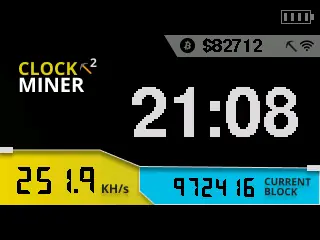
- Four screens: Miner stats, a clock with the Bitcoin price and block height, global network stats, and the Bitcoin price.
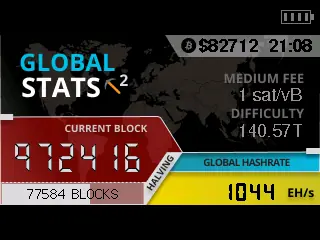
- Live network data: Block height, blocks to the next halving, fees, difficulty and the network hash rate.
- Phone setup: Choose your Wi-Fi, paste a Bitcoin address and set your time zone on a setup page.
- Battery aware: The status bar shows the battery level when a battery module is fitted.
Controls
L1 switches between the four screens; hold it for 5 seconds to clear the settings and open the setup page again. POWER turns the screen off and on.
Getting started
On first start the device opens a Wi-Fi network named NerdMinerAP. Join it from your phone, open the setup page, choose your Wi-Fi, paste your Bitcoin address into "Your BTC address" and set your time zone, then save; the setup page closes after 3 minutes without input. No address yet? You can start with the public genesis address 1A1zP1eP5QGefi2DMPTfTL5SLmv7DivfNa. Always paste the address: a typing mistake makes the pool reject it.
Good to know
Solo mining on a device this size is a lottery. Finding a block is extremely unlikely, so think of NerdMiner as a way to watch Bitcoin mining at work rather than a way to earn. If a block is ever found, the reward goes to the address you entered.
Compatibility
NerdMiner runs on Attaky Core and needs a Wi-Fi network with internet access. Add the battery module to see the battery level.
About this firmware
NerdMiner for Attaky is a port by Attaky of NerdMiner v2 by Bitmaker, adapted to the Attaky Core screen, keys and battery modules. The original project is released under the MIT License, with thanks to the upstream authors.
Install
Install straight from the Attaky firmware store. Open this listing in your browser and flash it to your Attaky in one tap. There is nothing to download or install — the firmware store writes it to your device for you.
Release Notes
First release for Attaky.
- A tiny solo Bitcoin miner on the Attaky Core: it joins a public mining pool over Wi-Fi and hashes on both processor cores, at about 250 thousand hashes per second.
- Four screens, switched with L1: the miner (hash rate, total hashes, shares, block templates and uptime), a clock with the Bitcoin price and block height, global network stats (block height, blocks to the halving, fees, difficulty and network hash rate), and the Bitcoin price.
- Setup from your phone: the device opens a Wi-Fi setup page where you choose your network, paste a Bitcoin address and set your time zone; the pool is public-pool.io by default.
- Settings are kept across restarts; hold L1 for 5 seconds to clear them and open the setup page again.
- POWER turns the screen off and on, and the status bar shows the battery level when a battery module is fitted.
Good to know
- Solo mining on a device this size is a lottery: finding a block is extremely unlikely, so treat it as a learning toy, not a way to earn.
- No Bitcoin address yet? You can start with the public genesis address 1A1zP1eP5QGefi2DMPTfTL5SLmv7DivfNa; any reward would go to that address. Paste addresses rather than typing them, or the pool rejects them.
- The setup page closes after 3 minutes; restart the device to open it again.
Download Files
| Flash Address | File Name | Action |
|---|---|---|
0x0 |
NerdMiner-1.8.3-A001-nerdminer-1.8.3-A001-bootloader.bin | Download |
0x8000 |
NerdMiner-1.8.3-A001-nerdminer-1.8.3-A001-partitions.bin | Download |
0xe000 |
NerdMiner-1.8.3-A001-nerdminer-1.8.3-A001-boot-app0.bin | Download |
0x10000 |
NerdMiner-1.8.3-A001-nerdminer-1.8.3-A001-firmware.bin | Download |