
Plane Radar
Version: 1.1.2-A001 | Published by Attaky
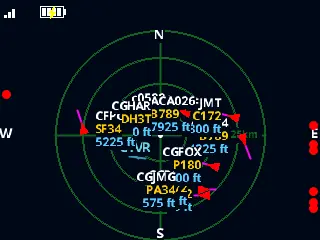
Plane Radar
A live aircraft radar for your Attaky — see the planes flying around you, right now.
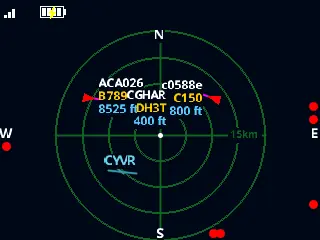
Plane Radar turns Attaky Core into a pocket flight tracker. Set your location once, and the planes around it appear on a round radar screen with their direction, speed and labels, updated every few seconds over Wi-Fi.
Highlights
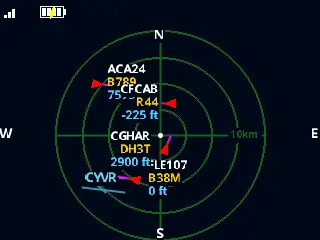
- Live aircraft around you: Each plane shows its heading, speed, callsign, aircraft type and altitude on the radar.
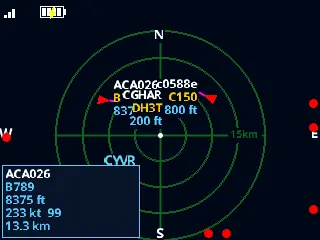
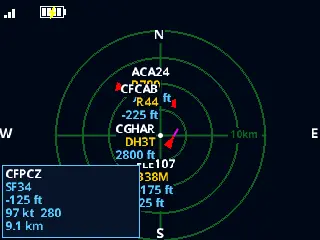
- Tap for details: Touch a plane to see its callsign, type, altitude, speed, heading and distance from you.
- Four ranges: Switch between 5, 10, 15 and 25 km; planes just beyond the range show as dots on the screen edge.
- Airport runways: An optional overlay draws the runways of large airports near you.
- Easy setup: The device opens a Wi-Fi setup page on first start; pick your network and enter the location to centre the radar on.
- Battery and status light: The status bar shows Wi-Fi strength and, with a battery module, the battery level; an RGB light shows the connection state.
Controls
Up and down change the range. SELECT opens the settings menu, with distance units, the runway overlay, the screen-off timer, About, and an option to clear the setup and start again. POWER turns the screen off and on. Tap a plane for its detail card and tap empty space to close it.
Compatibility
Plane Radar runs on Attaky Core and needs a Wi-Fi network with internet access. Add the battery module to see the battery level. Flight data comes from the free adsb.fi community network, so coverage depends on receivers near your location.
About this firmware
Plane Radar for Attaky is a port by Attaky of ESP32 Plane Radar by MatixYo, adapted to Attaky modular hardware with a full landscape radar, touch to select aircraft, keypad controls, a phone setup page, the RGB light and battery support. The original project is released under the MIT License, with thanks to the upstream author.
Install
Install straight from the Attaky firmware store. Open this listing in your browser and flash it to your Attaky in one tap. There is nothing to download or install — the firmware store writes it to your device for you.
Release Notes
First release for Attaky.
- A live aircraft radar on the Attaky Core screen: planes around your chosen location appear on a round radar with their heading, speed, callsign, aircraft type and altitude, refreshed every few seconds.
- Tap a plane for a detail card with its callsign, type, altitude, speed, heading and distance; tap empty space to close it.
- Up and down change the range between 5, 10, 15 and 25 km; aircraft just beyond the range show as dots on the screen edge.
- Optional runway overlay for large airports, distances in km or miles, and a screen-off timer.
- First-time setup from your phone: the device opens a Wi-Fi setup page where you choose your network and enter the location to centre the radar on.
- Battery level in the status bar when a battery module is fitted, and an RGB light that shows the connection state.
- Flight data comes from the free adsb.fi network over Wi-Fi; coverage depends on community receivers near you.
Download Files
| Flash Address | File Name | Action |
|---|---|---|
0x0 |
Plane_Radar-1.1.2-A001-plane-radar-1.1.2-A001-bootloader.bin | Download |
0x8000 |
Plane_Radar-1.1.2-A001-plane-radar-1.1.2-A001-partitions.bin | Download |
0xe000 |
Plane_Radar-1.1.2-A001-plane-radar-1.1.2-A001-boot-app0.bin | Download |
0x10000 |
Plane_Radar-1.1.2-A001-plane-radar-1.1.2-A001-firmware.bin | Download |