WalkieTalkie
Version: 1.0.0 | Published by Attaky
WalkieTalkie
Push-to-talk for a group of Attaky devices — no router, no account, no app.
WalkieTalkie turns Attaky Core with the Media-IO module into a group walkie-talkie. Devices talk to each other directly over short-range 2.4 GHz radio, so there is nothing to set up: create a group, let friends nearby join with a 4-digit code, and hold a key to talk. It works anywhere, with no Wi-Fi network, phone or cloud service involved.
Highlights
- Talk without infrastructure: Devices connect directly to each other — no router, no account, no companion app.
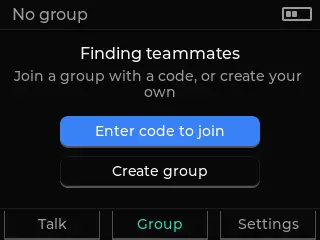
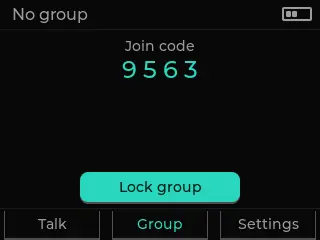
- Simple group setup: Create a group, share the 4-digit join code, and lock the group when everyone is in; up to 7 devices including the host.
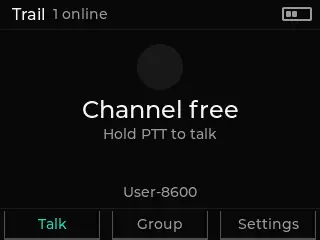
- Push to talk: Hold R1 to speak; the screen shows who is talking and who is online.
- Encrypted voice: Voice is encrypted with a group key that is shared when members join.
- A group that looks after itself: The group is remembered across restarts and rejoins automatically, and if the host disappears another member takes over.
- Clear status at a glance: An RGB light shows when you are talking, when someone else is, and the group's state.
How it works
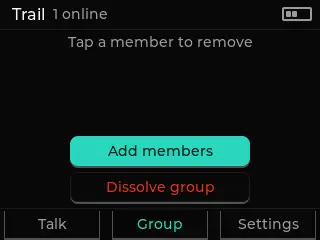
Every device in the group is equal when talking: one person speaks at a time, half-duplex like a classic walkie-talkie. The host manages the group — adding or removing members, handing off and leaving, or dissolving it. Range depends on the surroundings, as with any short-range radio.
Known limitations
Members added after the group is locked do not appear in the rosters of earlier members until those members leave and join the group again; restarting alone does not refresh the roster. The 4-digit join code is sent openly while people are joining, so pair in a place you trust.
Controls
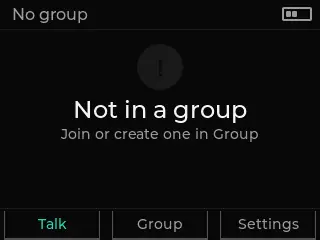
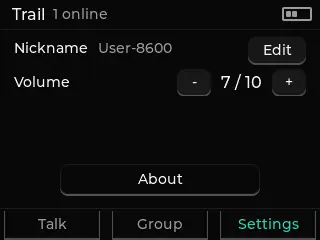
Hold R1 to talk and release to listen. Up and down set the volume from 0 to 10. Everything else is on the touchscreen: the Talk, Group and Settings tabs at the bottom, where you can also change your nickname and volume. The screen sleeps after 30 seconds without use and wakes on touch, any key, or when someone in the group starts talking.
Compatibility
WalkieTalkie requires Attaky Core with the Media-IO module for the microphone and speaker. Add the battery module to use it on the move and see the battery level. You need at least two devices running WalkieTalkie to talk.
Install
Install straight from the Attaky firmware store. Open this listing in your browser and flash it to your Attaky in one tap. There is nothing to download or install — the firmware store writes it to your device for you.
Release Notes
First release.
- Group push-to-talk between Attaky devices over direct device-to-device radio: no router, no account, no app and no cloud.
- Create a group, share the 4-digit join code with people nearby, then lock the group; up to 7 devices including the host.
- Hold R1 to talk; half-duplex like a classic walkie-talkie, and the screen shows who is talking and who is online.
- Voice is encrypted with a group key that is shared when members join.
- The group is remembered across restarts and rejoins automatically. The host can add or remove members, hand off and leave, or dissolve the group; if the host disappears, another member takes over.
- Volume in 11 steps (0 to 10) with up and down, nickname and volume in Settings, and an RGB light that shows talking, receiving and group status.
- The screen sleeps after 30 seconds without use and wakes on touch, any key, or when someone in the group starts talking.
Known limitations
- Members added after the group is locked do not appear in the rosters of earlier members until those members leave and join the group again; restarting alone does not refresh the roster.
- The 4-digit join code is sent openly while people are joining, so pair in a place you trust.