





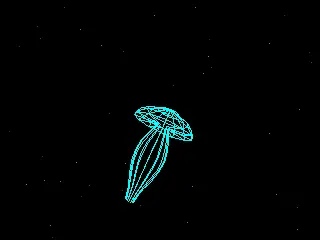
Denki Kurage
An electric jellyfish for your desk — a calm, low-poly 3D jellyfish that swims across your Attaky screen.
Denki Kurage (Japanese for "electric jellyfish") turns Attaky Core into a small ambient display. A retro, low-poly 3D jellyfish drifts and turns on its own while particles flow through the water around it. There is nothing to set up and nothing to connect: power it on, watch the jellyfish swim, and relax.
Highlights
- Retro 3D jellyfish: A low-poly jellyfish swims across the full landscape screen, pulsing, drifting and slowly changing its spin.
- Four color schemes: Purple, cyan, gold and white, each matched by the RGB indicator light.
- Solid or wireframe: Switch between a filled jellyfish and a glowing wireframe.
- Touch and key controls: Raise or lower the jellyfish, turn the view, change color and switch the look by touch or with the physical keys.
- Remembers your setup: Color, look and screen brightness are kept across restarts.
- Fully offline: No network, no account and no extra modules — just Attaky Core.
Touch controls
Hold the top of the screen to make the jellyfish rise with a faster upward current, or the bottom to make it sink as the flow reverses. Hold the left or right side to turn the view. Tap the center to change the color scheme, and tap the top-right corner to switch between solid and wireframe.
Keys
Up and down raise and lower the jellyfish, left and right turn the view, SELECT changes the color scheme and L1 switches between solid and wireframe. The BOOT key steps through four screen brightness levels.
Compatibility
Denki Kurage runs on Attaky Core on its own. No other modules are needed, and it does not use Wi-Fi or Bluetooth.
About this firmware
Denki Kurage for Attaky is a port by Attaky of Denki Kurage by likeablob, adapted to Attaky modular hardware with a landscape layout, capacitive touch, physical key controls and the RGB indicator. The original project is released under the MIT License, with thanks to the upstream author.
Install
Install straight from the Attaky firmware store. Open this listing in your browser and flash it to your Attaky in one tap. There is nothing to download or install — the firmware store writes it to your device for you.
Release Notes
First release for Attaky.
- A low-poly 3D jellyfish swims across the full Attaky Core screen in landscape, drifting and turning on its own while particles flow through the water around it.
- Four color schemes (purple, cyan, gold and white) and a solid or wireframe look.
- Touch controls: hold the top or bottom of the screen to raise or lower the jellyfish and change the water flow, hold the left or right side to turn the view, tap the center to change color, and tap the top-right corner to switch between solid and wireframe.
- The physical keys do the same: up and down raise and lower, left and right turn the view, SELECT changes color, and L1 switches solid or wireframe.
- The BOOT key steps through four screen brightness levels.
- The RGB indicator light follows the current color scheme.
- Color, look and brightness are remembered across restarts.
Download Files
| Flash Address | File Name | Action |
|---|---|---|
0x0 |
Denki_Kurage-1.0-A001-denki-kurage-1.0-A001-bootloader.bin | Download |
0x8000 |
Denki_Kurage-1.0-A001-denki-kurage-1.0-A001-partitions.bin | Download |
0xe000 |
Denki_Kurage-1.0-A001-denki-kurage-1.0-A001-boot-app0.bin | Download |
0x10000 |
Denki_Kurage-1.0-A001-denki-kurage-1.0-A001-firmware.bin | Download |