FM/AM Radio (TEF6686_ESP32)
Version: 2.20-A003 | Published by Attaky
FM/AM Radio
A full-band FM and AM receiver for Attaky Core, with touch tuning, live signal readouts, and optional Wi-Fi extras.
FM/AM Radio turns Attaky Core plus the FM/AM Radio module into a full-band broadcast receiver with a large touchscreen and a high-performance receiver front end. Tune local broadcasts, save favourite stations, and read signal details from a clear on-device interface built for everyday listening and FM-DX exploration.
Highlights
- Full-band FM and AM reception: Listen across the broadcast bands with a high-performance receiver front end.
- Touchscreen tuning: Enter a frequency, step through the band, and store favourite stations from a large, clear touchscreen.
- FM broadcast data: View RDS station name, radio text, and other available broadcast data where supported by the station.
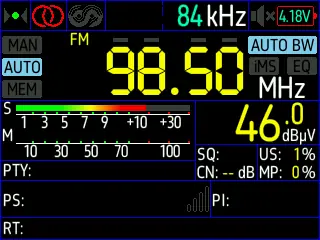
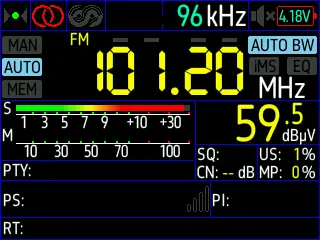
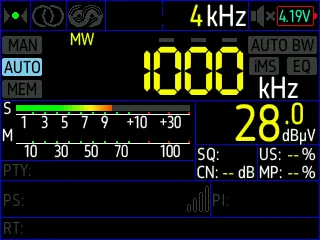
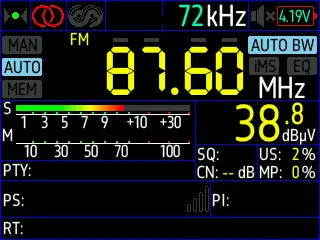
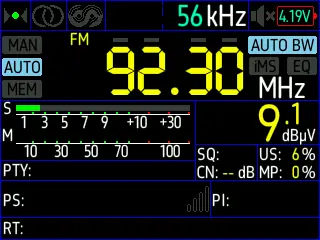
- Live signal readouts: See signal strength, S-meter and dBµV readings, stereo or mono status, bandwidth, and tuning information.
- Battery level on screen: A segmented battery indicator with a voltage readout when the battery module is fitted.
- Screensaver and standby: The display blanks on an idle timer while audio keeps playing, so the radio can run unattended.
- Optional Wi-Fi features: Use the on-device Wi-Fi setup portal to enable time sync and upstream community FM-DX tools when desired.
- Modular Attaky hardware: Run it on Attaky Core with the FM/AM Radio module, then add the battery module for portable listening.
Tuning by touch
Use the large touchscreen as the main tuner. Dial in a frequency directly, move through FM or AM in steps, and keep favourite stations close for quick return listening. The interface is built around clear frequency controls, so the radio can move between casual listening and precise tuning without extra equipment.
Reading the signal
FM/AM Radio shows more than audio. Live readouts display signal strength in S-meter and dBµV, stereo or mono status, bandwidth, and tuning information. On FM broadcasts with RDS, the screen can show station name, radio text, and other broadcast data when available.
Optional Wi-Fi extras
Network features are optional. The on-device Wi-Fi setup portal can enable time sync and upstream community FM-DX tools, including reception-spot submission, when configured. Leave Wi-Fi unconfigured and those network features stay off.
Everyday controls
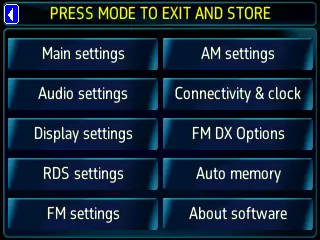
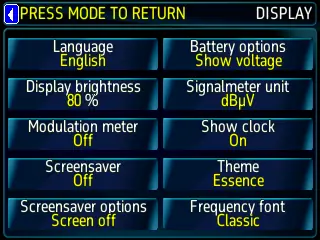
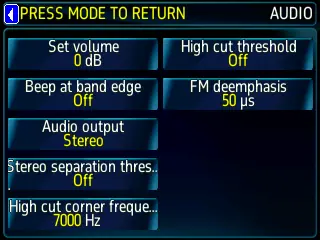
The interface exposes practical radio and display settings for audio, RDS, FM and AM band behaviour, connectivity, FM-DX, auto memory, brightness, theme, language, clock display, screensaver, battery indication, signal-meter unit, and frequency font. The result is a receiver that can be adjusted for the way the broadcast sounds, the way the screen reads, and the way the radio is used.
Compatibility
FM/AM Radio requires Attaky Core paired with the FM/AM Radio module for reception. A bare Attaky Core can boot the app, but there is no tuner without the radio module installed. Add the battery module for portable use away from a fixed power source.
Known limitations
The upstream project serves the amateur-radio and FM-DX community, so some screens retain ham and DX terminology plus optional community tools such as reception-spot submission. Those network tools are optional and off unless configured. Full reception functionality requires the FM/AM Radio module. In this version the automatic memory scan does not store presets, and a logbook entry cannot be written manually from the device.
Upstream and license
FM/AM Radio is a port by Attaky of the open-source project TEF6686_ESP32 by PE5PVB to Attaky modular hardware. The project is licensed GPL-3.0, and corresponding source is published per the license. Upstream authorship and the GPL-3.0 license are retained, with thanks to the upstream author.
Install
Install straight from the Attaky firmware store. Open this listing in your browser and flash it to your Attaky in one tap. There is nothing to download or install — the firmware store writes it to your device for you.
Release Notes
What's new
- The side keys now follow the tuning mode: a short press steps one frequency step in manual mode, seeks in auto mode, and moves to the previous or next stored preset in memory mode.
- Hold a side key for about a second to seek down or up. In manual mode the press takes one step straight away and the seek starts once the key has been held; holding does not repeat steps.
- Pressing a side key while a seek is running stops the seek without stepping.
- The left key cycles the tuning step size. If the radio is not in manual tuning, it switches to manual first so the new step size takes effect right away.
- A long-press seek in manual mode scans on the normal band grid, then restores your selected step size when it finds a station or when you stop it with a side key.
Known limitations
- The automatic memory scan does not store presets in this version.
- A logbook entry cannot be written manually from the device; automatic logging during an FM DX scan is unaffected.
- Auto-mode seeks and touch-cancelled long-press seeks may reset the selected step size; press the left key to choose it again.
- Installing this version resets stored settings.
Download Files
| Flash Address | File Name | Action |
|---|---|---|
0x0 |
FM_AM_Radio_TEF6686_ESP32_-2.20-A003-fm-am-radio-2.20-A0_OACNScS.bin | Download |
0x8000 |
FM_AM_Radio_TEF6686_ESP32_-2.20-A003-fm-am-radio-2.20-A0_dXoLYlL.bin | Download |
0x9000 |
FM_AM_Radio_TEF6686_ESP32_-2.20-A003-fm-am-radio-2.20-A0_UT6y9i0.bin | Download |
0x20000 |
FM_AM_Radio_TEF6686_ESP32_-2.20-A003-fm-am-radio-2.20-A0_DPW9rD5.bin | Download |
0x7D0000 |
FM_AM_Radio_TEF6686_ESP32_-2.20-A003-fm-am-radio-2.20-A0_0DEXRZp.bin | Download |