
Pocketpedia
Version: 0.5.0 | Published by Attaky
A pocket offline reader for Wikipedia and other .zim archives — search, open, and navigate full articles directly on your Attaky, with no computer and no internet.
Pocketpedia reads standard .zim archives straight from an SD card on the Attaky Core — load a full Wikipedia edition, Wikivoyage, Wiktionary, or another collection. Put an archive on the card, and the whole library is searchable and readable on the device: type a title, open the article, follow its links, and keep your place — all offline.
Highlights
- Fully offline: reads Wikipedia and other .zim archives directly from the SD card — no computer, no preprocessing, no internet connection.
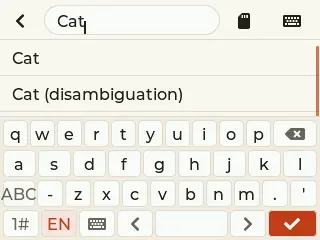
- On-device search: type a title and see live suggestions, then open the article.
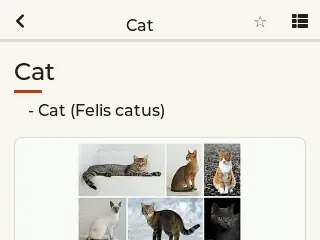
- Full articles: read complete articles with smooth scrolling and tappable in-article links.
- Find your way: follow links and step back through your reading path.
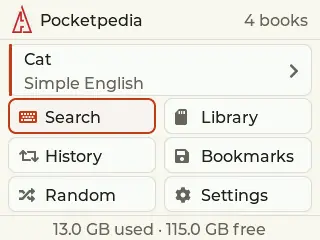
- Home shell: continue where you left off, browse the library, and reach history, bookmarks, and a random article.
- Multi-language text: built-in fonts cover Latin along with CJK and Hangul.
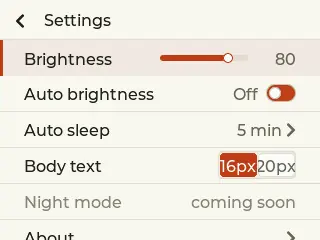
- Comfortable reading: adjustable body text size, brightness with optional auto-brightness, and auto-sleep.
- Optional keyboard: the Attaky keyboard module makes searching faster.
Read offline, anywhere
Pocketpedia keeps an entire .zim archive on the device's SD card and reads it in place. Once the card is in, everything is available on the handheld — there is nothing to sync, no companion app, and no network.
Load Wikipedia and other archives
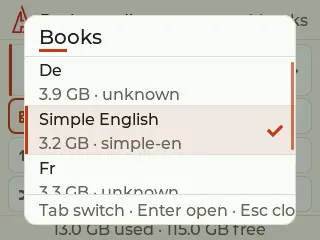
Pocketpedia reads standard .zim archives, so you can load a full Wikipedia edition — Simple English, full English, or another language — along with projects like Wikivoyage and Wiktionary. Download the free archive you want from the Kiwix library, copy it onto the SD card, and it is ready to read. Format larger cards as exFAT for archives over 4 GB.
Search and open any article
Start typing a title and Pocketpedia shows live suggestions from the archive. Pick one to open the full article; the reader lays out headings, paragraphs, lists, and links for reading on the small screen.
Follow links and find your way back
In-article links are tappable. Follow a link to jump to a related article, and step back through your path to return — so exploring an archive stays quick and never leaves you stranded.
Keep your place
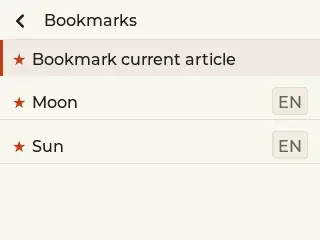
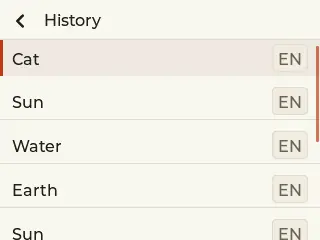
Pocketpedia remembers where you were. A continue card takes you back to your last article, and history, bookmarks, and a random-article shortcut are all on the home screen.
Comfortable to read
Set the body text size to suit your eyes, adjust the screen brightness or let auto-brightness handle it, and let the display sleep on its own to save power. Your preferences are stored on the device.
Use touch or the optional keyboard
Pocketpedia is touch-first for scrolling, searching, and following links. Fit the optional Attaky keyboard module to type searches faster.
Compatibility
Pocketpedia requires the Attaky Core and the Media-IO module (for the SD card that holds the .zim archive). The Attaky keyboard module is optional and speeds up searching. You supply your own .zim archive on the SD card.
Install
Install straight from the Attaky firmware store — open this listing in your browser and flash it to your Attaky in one tap. There's nothing to download or install; the firmware store writes it to your device for you.
<sub><sup>Trademarks and content: Pocketpedia is an independent Attaky firmware, not affiliated with, endorsed by, or sponsored by the Wikimedia Foundation or Kiwix. Wikipedia is a trademark of the Wikimedia Foundation. You supply your own .zim archives; their content stays under its own license (Wikipedia content is available under CC BY-SA).</sup></sub>
Release Notes
- Reads Wikipedia and other .zim archives directly on-device from an SD card — no computer or internet needed.
- Load free .zim archives (Wikipedia and more) from the Kiwix library.
- On-device search with live title suggestions.
- Full-article reading with smooth scrolling and tappable in-article links.
- Home shell — continue reading, library, history, bookmarks, and random article.
- Multi-language fonts — Latin, CJK, and Hangul coverage.
- Comfort controls — adjustable text size, brightness with optional auto-brightness, and auto-sleep.
- Optional Attaky keyboard module for faster searching.